MovieBox Pro for iPhone – Watch free movies, TV shows & live sports. No subscription. No jailbreak. Works on iOS 15–18. Download IPA.

You are paying for Netflix, Disney+, and maybe Apple TV+ and you still cannot find half the things you actually want to watch. That is not a streaming problem. That is a subscription problem. MovieBox Pro on iPhone gives you a library that puts all three together to shame, and the monthly cost is zero.
No jailbreak. No complicated setup. No Apple ID tricks. Just a free app on your iPhone that works. You just need to download the IPA file and install on your iOS to watch free movie streaming without ads. The IPA file is the installation package for iOS , you can Install IPA file on Ipad with same process. If you finding APK (android installation package) then it does not work, you need to go to homepage to download moviebox pro apk for android.
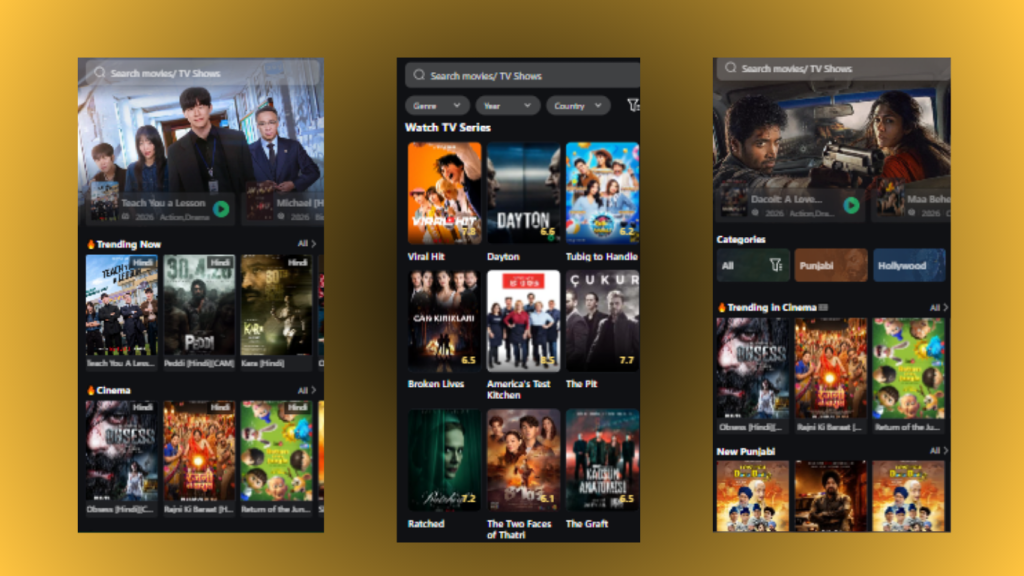
What You Get on Your iPhone
| Detail | Specification |
|---|---|
| App Size | 62MB |
| File Format | IPA (not APK — iPhone uses a different format) |
| iOS Compatibility | iOS 15, 16, 17, 18 |
| Jailbreak Required | No |
| App Store Available | No — sideload only |
| Install Time | 10–15 minutes (one time) |
| Login Required | No — watch immediately |
| Content Quality | HD, Full HD, 4K |
| AirPlay Support | Yes — cast to Apple TV and AirPlay TVs |
| Offline Downloads | Yes — save to iPhone storage |
| Subtitles | 20+ languages |
| Cost | Free |
Why iPhone Users Specifically Switch to MovieBox Pro
The Subscription Stack Problem
The average iPhone user in 2026 pays for 3.4 streaming subscriptions. That is $45–70 every month before you have even opened a single app. And despite all of it, you still find yourself scrolling through menus looking for something worth watching, then giving up and rewatching something you have already seen.
MovieBox Pro does not replace Netflix entirely. It fills every gap Netflix leaves the films that rotated out last month, the Korean drama your friend recommended that is not on any Western platform, the anime series that exists only on a Japanese streaming service, the Bollywood releases that never made it to your region. It is the missing piece of your existing setup, not a replacement for it.
Apple’s App Store Does Not Have Everything
Apple’s App Store policies are strict about streaming aggregators. Any app that pulls content from external sources without direct licensing agreements gets rejected. That is why MovieBox Pro is not in the App Store, not because it is unsafe, but because it aggregates links from across the internet in ways Apple will not approve.
The result is a better app than anything Apple allows. The content library is wider, the links are fresher, and the titles update daily. The trade-off is a slightly longer installation process compared to tapping Get in the App Store. That trade-off is worth it.
Waiting for Cinema Releases or Streaming Windows Is Frustrating
Studios have extended the theatrical-to-streaming window back to 90+ days in 2026. That means a film you wanted to watch leaves cinemas in January and does not appear on any streaming service until April. MovieBox Pro sources links that appear long before official streaming releases — often within days of a film becoming available online. If you follow new releases closely, the difference in timeliness is significant.
Travelling With a Phone Full of Downloaded Content
iPhone users who travel know the drill: download episodes before the flight, hit the four-hour limit on one streaming service’s download policy, and run out of things to watch somewhere over the Atlantic. MovieBox Pro has no download limit. Download as many films and episodes as your iPhone storage can hold before any trip. No policies, no restrictions, no expiry on what you downloaded.
What iPhone-Specific Features You Actually Get
AirPlay — Your iPhone as the Remote: MovieBox Pro has built-in AirPlay 2 support. Tap the cast icon inside the player, select your Apple TV or AirPlay-compatible smart TV, and your stream jumps from your iPhone screen to the big screen instantly. Your iPhone becomes the remote. Volume, pause, skip — all controlled from your hand while the video plays on the wall. No Chromecast dongle, no extra hardware, nothing your iPhone does not already know how to do.
Siri Shortcuts Integration: MovieBox Pro on iOS 14 and above integrates with Siri Shortcuts. Set up a shortcut to open the app with a voice command, automate your streaming schedule using Apple’s Automation feature, or add a home screen shortcut that opens directly to your watchlist. Small feature, genuinely useful for daily use.
Picture in Picture — Native iOS Support: The iOS Picture in Picture mode works natively with MovieBox Pro. Swipe up to exit while a video is playing and the video shrinks to a floating window in the corner — exactly how it works with Apple TV+ or Netflix. Browse your phone normally while the film continues.
Control Centre Integration: Pause, resume, skip, and control volume from the iOS Control Centre without opening the app. The same playback controls you see when listening to Spotify appear for MovieBox Pro streams. Works with headphones, AirPods, and the lock screen media controls.
No Battery Drain Spike: MovieBox Pro is optimised for mobile streaming, not desktop performance. It does not run background processes when you are not watching, does not keep the screen alive between sessions, and does not push unnecessary background refreshes. On a typical iPhone, a two-hour MovieBox Pro stream uses similar battery to two hours of Netflix.
Getting MovieBox Pro For iPhone — The Short Version
MovieBox Pro uses an IPA file (the iPhone equivalent of an Android APK). You install it using a free tool called AltStore or Feather that signs the app with your Apple ID. No jailbreak, no developer account, no payment.
Three paths available:
AltStore: Requires a Mac or PC once for setup, then auto-refreshes in the background. Most stable long-term option.
Feather: Runs entirely on your iPhone. No computer involved at any point. Best option if you do not have regular access to a computer.
AppValley: No Apple ID needed. Quickest setup but occasionally interrupted by Apple certificate revocations.
The full walkthrough with exact steps for each method including the 7-day certificate refresh that all three require is in the complete iPhone installation guide. Every step is covered with screenshots described in plain language. Most users are streaming within 15 minutes of starting.
iPhone Compatibility — Every Model Covered
| iPhone Model | iOS Support | MovieBox Pro Works? | 4K Available? |
|---|---|---|---|
| iPhone 16 / 16 Pro / 16 Pro Max | iOS 18 | ✅ Full support | ✅ Yes |
| iPhone 15 / 15 Pro / 15 Pro Max | iOS 17–18 | ✅ Full support | ✅ Yes |
| iPhone 14 / 14 Pro / 14 Pro Max | iOS 16–18 | ✅ Full support | ✅ Yes |
| iPhone 13 series | iOS 15–18 | ✅ Full support | ✅ Yes |
| iPhone 12 series | iOS 15–18 | ✅ Full support | ✅ Yes |
| iPhone 11 series | iOS 15–17 | ✅ Full support | ✅ HD/FHD |
| iPhone X / XS / XR | iOS 15–16 | ✅ Works | ✅ HD/FHD |
| iPhone SE (2nd / 3rd Gen) | iOS 15–17 | ✅ Works | ✅ HD/FHD |
| iPhone 8 and below | iOS 14 and below | ❌ Not supported | — |
The One Thing to Know Before You Download
MovieBox Pro is not in the App Store and there is actually a fake app in the App Store that uses a similar name. It has a 2.4 star rating and is not the real application. Do not download it.
The real MovieBox Pro comes as an IPA file installed through AltStore, Feather, or AppValley. When you install it, iOS will ask you to trust the developer profile under Settings → General → VPN & Device Management. This is a standard step for any sideloaded app — tap Trust and the app opens normally.
If someone asks you to pay for a MovieBox Pro download, or sends you to a survey before giving you the download link, that is not the real app. The official IPA is free. Always. If you want to know about app security then read safety guide.
Frequently Asked Questions
Does MovieBox Pro work on iPhone without jailbreaking? Yes. All installation methods in 2026 — AltStore, Feather, AppValley — work on a standard, unjailbroken iPhone running iOS 15 or above. Your iPhone stays on its normal iOS version throughout.
Why is MovieBox Pro not in the Apple App Store? Apple’s App Store policies reject apps that aggregate third-party streaming links without direct content licensing. MovieBox Pro works as a link aggregator — it finds publicly available streams and plays them — which puts it outside what Apple permits in the App Store. The app itself is legal software. The App Store exclusion is a policy decision, not a safety one.
Does it work with AirPlay? Yes. MovieBox Pro supports AirPlay 2 natively on iPhone. Tap the cast icon inside the player and select your Apple TV or AirPlay-compatible smart TV. The stream switches to your TV and your iPhone becomes the remote.
How long does installation take? Between 10 and 15 minutes for first-time setup. After that, opening and using the app is instant — same as any other iPhone app. The only ongoing maintenance is a certificate refresh every 7 days, which takes about 30 seconds in AltStore or Feather.
Can I download movies to watch offline on my iPhone? Yes. The offline download feature works on iOS exactly as it does on Android. Tap the download icon on any title, select your preferred quality, and the file saves to your iPhone’s local storage. It plays without any internet connection.
Is there an iPad version too? The same IPA file that runs on iPhone runs on iPad. The interface scales for the larger iPad screen automatically. A separate download page and compatibility guide for iPad is available at MovieBox Pro for iPad.
Is Invitation Code Works in Moviebox Iphone? Yes, also working in iOS devices. You can use this invitation code to unlock full access.
Ready to Stop Paying for Gaps in Your Streaming Library?
MovieBox Pro on iPhone costs nothing to download and nothing to use. The only investment is 15 minutes of one-time setup.
If you hit any point in the installation where something is unclear, every method is broken down step by step in the full iOS guide including the certificate refresh process, troubleshooting common errors, and how to switch between AltStore and Feather if one stops working for you.