MovieBox Pro for iPad lets you stream movies on iPadOS 15–18 via direct IPA download – no jailbreak, all iPad models supported.

App Info
| Detail | Specification |
|---|---|
| Version | v15.6 |
| File Format | IPA (iPad/iPhone format — not APK) |
| iPadOS Required | iPadOS 15 and above |
| Jailbreak Needed | No |
| Install Method | AltStore, Feather, or AppValley |
| Screen Optimised | Yes — multi-column iPad layout |
| AirPlay Support | Yes — cast to Apple TV and AirPlay TVs |
| Split View | Yes — works in iPadOS Split View |
| Offline Downloads | Unlimited — no expiry |
| Subtitles | 20+ languages with size and colour control |
| Cost | Free |
Your iPad has a screen built for watching. A display that size deserves better than endlessly rotating subscription libraries that remove half your watchlist every quarter. MovieBox Pro gives your iPad permanent, unrestricted access to over 200,000 titles. Its free, no monthly payment, no content licensing windows that take away what you saved last week.
This is the iPad-specific download page. If you are on an iPhone instead, the iPhone version covers that setup. Android tablet users need the APK version — the IPA file on this page is iPad and iPhone only.
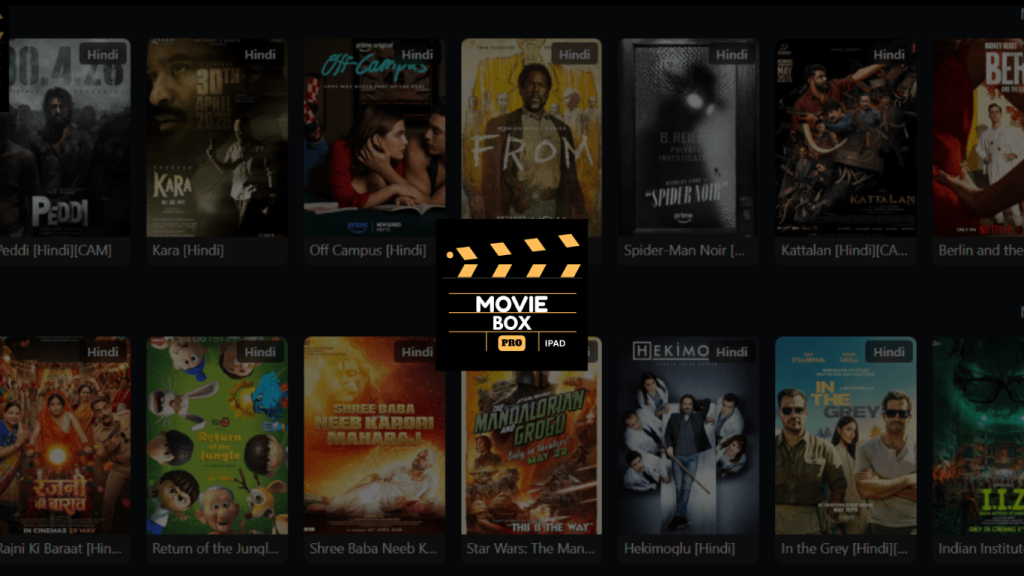
Why iPad Is the Best Device for MovieBox Pro
Most streaming apps treat tablets as an afterthought — the same phone interface stretched to fill more pixels. MovieBox Pro on iPadOS uses the larger canvas properly. The grid layout expands into a multi-column library browser. Cover art is larger and more detailed. The player fills the full display without letterboxing on iPad Pro models.
The real pain point for iPad users is storage versus content. You paid for a 128 GB or 256 GB iPad and yet every streaming app caps offline downloads at 25 titles, expires them after 30 days, or counts them against a device limit. MovieBox Pro’s offline download feature has none of those restrictions. Download as many films as your storage holds. They do not expire. There is no device cap.
What Specifically Makes It Worth Using on iPad
Full-screen, properly scaled interface: On iPad Pro 12.9-inch, MovieBox Pro displays content in a wide-grid layout with larger thumbnails, more visible metadata, and a theatre-mode player that uses every pixel of the display. It does not feel like a blown-up phone app.
Split View multitasking: iPadOS Split View works with MovieBox Pro. Keep the app running on one half of the screen while you browse Reddit, check messages, or look up information about what you are watching on the other half. The video continues playing uninterrupted.
AirPlay to Apple TV: Tap the AirPlay icon inside the MovieBox Pro player and the stream jumps to your Apple TV or any AirPlay 2-compatible television. Your iPad stays in your hand as the remote. No Chromecast adapter, no HDMI cable, no additional hardware.
Apple Pencil annotation (casual): Some iPad Pro users use the Apple Pencil to annotate while watching documentaries or educational content. MovieBox Pro does not interfere with system-level Pencil functions — you can draw or take notes in a floating panel while a video plays in PiP.
Download to iPad for offline viewing: Movies and episodes download directly into MovieBox Pro’s local storage on your iPad. The quality is selectable and download in 720p for space efficiency or 1080p for maximum quality. Downloaded content plays without any network connection.
iPad Compatibility
| iPad Model | iPadOS | Compatible | Notes |
|---|---|---|---|
| iPad Pro 13-inch (M4) | iPadOS 17–18 | ✅ Full support | Largest display, best experience |
| iPad Pro 11-inch (M4) | iPadOS 17–18 | ✅ Full support | ProMotion display |
| iPad Air 13-inch (M2) | iPadOS 17–18 | ✅ Full support | |
| iPad Air 11-inch (M2) | iPadOS 17–18 | ✅ Full support | |
| iPad Pro (M1, M2) | iPadOS 15–18 | ✅ Full support | |
| iPad Air (4th, 5th Gen) | iPadOS 15–18 | ✅ Full support | |
| iPad (9th, 10th Gen) | iPadOS 15–18 | ✅ Full support | |
| iPad mini (5th, 6th Gen) | iPadOS 15–18 | ✅ Full support | Compact form factor |
| iPad (older, iPadOS 14) | iPadOS 14 | ❌ Not supported | Update required |
How to Install MovieBox Pro for iPad — The Short Version
MovieBox Pro is not on the App Store. Apple’s policies reject streaming aggregator apps regardless of safety. Installation uses an IPA file — the iPad equivalent of an Android APK — signed with your Apple ID through a free tool called AltStore or Feather.
Three paths:
AltStore: Requires a Mac or PC once for initial setup. Auto-refreshes the certificate in the background every 7 days. Most stable option for daily use.
Feather: Runs entirely on your iPad. No computer at any point. Sends expiry notifications before the 7-day certificate limit so the app never unexpectedly stops opening.
AppValley: No Apple ID required. Fastest setup but relies on enterprise certificates that Apple occasionally revokes.
The 7-day refresh is the only ongoing maintenance — it takes 30 seconds in AltStore or Feather and your data is never affected. Every step for all three methods is in the complete iPad and iPhone installation guide.
Frequently Asked Questions
Is this different from the iPhone version? The same IPA file works on both iPhone and iPad. The difference is the interface — on iPad it uses a wider, multi-column layout suited to the larger display. Installation and features are identical.
Does the iPad version support 4K streaming? Yes, where 4K stream sources are available for a title. On iPad Pro with a Liquid Retina XDR display, the visual difference between 1080p and 4K is noticeable. The app automatically selects the best quality for your connection.
Can I use MovieBox Pro while charging my iPad? Yes, without any issues. Streaming is no different from running Netflix or YouTube while charging.
Does it work with iPad keyboard covers? Standard iPadOS keyboard shortcuts work at the system level — they do not directly control MovieBox Pro’s player, but you can switch apps, use Spotlight, and manage Split View normally.
Do I need an invitation code? No — tap Skip or Browse as Guest when the app opens. You get instant access to the full content library without registering. A code is only needed if you want to create an account for cross-device watchlist sync. Free codes are available in under 15 minutes through the methods.
What if MovieBox Pro stops opening after a few days? This is the 7-day Apple certificate expiry — a standard limitation of free Apple ID certificates used for sideloading. Open AltStore or Feather and tap Refresh. Done in 30 seconds. Full explanation in the troubleshooting guide.